Wykorzystujemy pliki cookies i podobne technologie w celu usprawnienia korzystania z serwisu Chomikuj.pl oraz wyświetlenia reklam dopasowanych do Twoich potrzeb.

Jeśli nie zmienisz ustawień dotyczących cookies w Twojej przeglądarce, wyrażasz zgodę na ich umieszczanie na Twoim komputerze przez administratora serwisu Chomikuj.pl – Kelo Corporation.

W każdej chwili możesz zmienić swoje ustawienia dotyczące cookies w swojej przeglądarce internetowej. Dowiedz się więcej w naszej Polityce Prywatności - http://chomikuj.pl/PolitykaPrywatnosci.aspx.

Jednocześnie informujemy że zmiana ustawień przeglądarki może spowodować ograniczenie korzystania ze strony Chomikuj.pl.

W przypadku braku twojej zgody na akceptację cookies niestety prosimy o opuszczenie serwisu chomikuj.pl.

Wykorzystanie plików cookies przez Zaufanych Partnerów (dostosowanie reklam do Twoich potrzeb, analiza skuteczności działań marketingowych).

Wyrażam sprzeciw na cookies Zaufanych Partnerów
NIE TAK

Wyrażenie sprzeciwu spowoduje, że wyświetlana Ci reklama nie będzie dopasowana do Twoich preferencji, a będzie to reklama wyświetlona przypadkowo.

Istnieje możliwość zmiany ustawień przeglądarki internetowej w sposób uniemożliwiający przechowywanie plików cookies na urządzeniu końcowym. Można również usunąć pliki cookies, dokonując odpowiednich zmian w ustawieniach przeglądarki internetowej.

Pełną informację na ten temat znajdziesz pod adresem http://chomikuj.pl/PolitykaPrywatnosci.aspx.

Nie masz jeszcze własnego chomika? Załóż konto

ES_File_Explorer_File_Manager_3_1_2.apk

rafaldlc_loginhaslo / ANDROID / APLIKACJE(1) / ES_File_Explorer_File_Manager_3_1_2.apk
Download: ES_File_Explorer_File_Manager_3_1_2.apk

4,08 MB

0.0 / 5 (0 głosów)
.

obrazekobrazekobrazek

Opis
Darmowy menadżer plików, aplikacji i taskkiller do zarządzania telefonem i PC.

*kopiuj/wytnij przenieś
*widok minitur
*wielokrotne zaznaczenie
*edycja tekstu
*zarządzanie aplikacjami
*wyślij jako
*wyszukiwanie
*obsługa zip
*obsługa FTP
*dostęp do PC

English description:
ES, 200 millions global downloads, file manager trend leader on Android!

Rated one of best resource management tools on Android market.

V3 is coming! Classic Theme can be downloaded on Google Play.

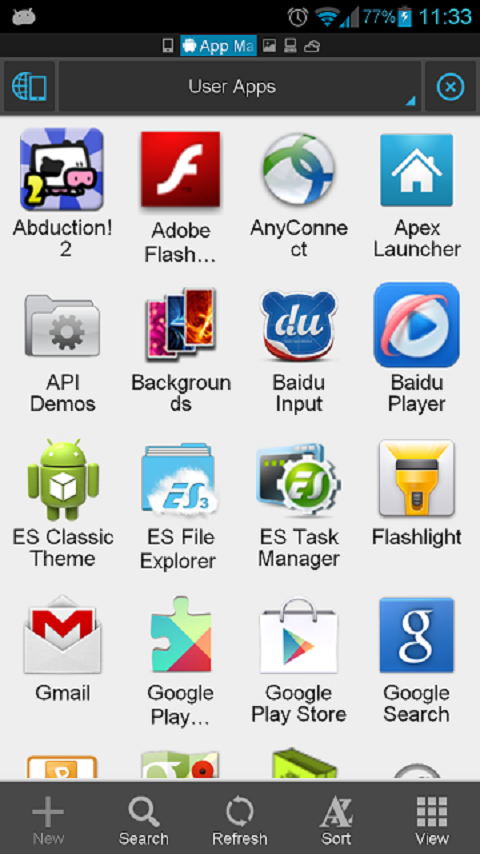
ES File Explorer is a free, full-featured file and application manager.
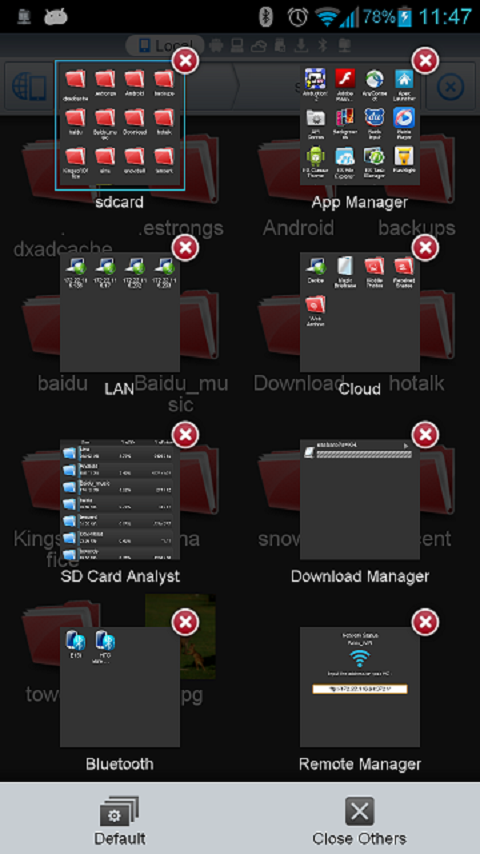
It functions as all of these apps in one: file manager, application manager, task killer, cloud storage client (compatible with Dropbox, Google Drive, SkyDrive, Box.net, Sugarsync, Yandex, Amazon S3, and Ubuntu One), FTP client, and LAN Samba client.
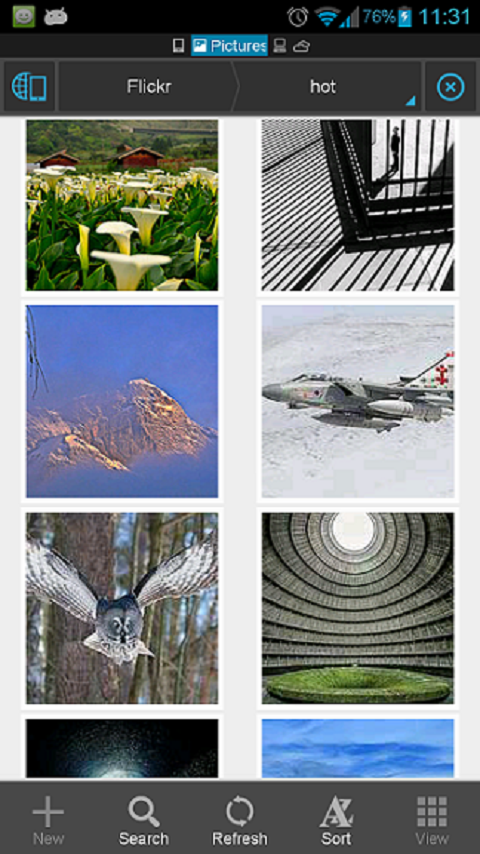
It provides access to pictures, music, video, documents, and other files on both your Android devices and your computers.

ES File Explorer allows Android users, no matter where they are, to manage their resources for free. You can see and access all of your files from your mobile device and share them with others.
The app makes it easy to stay connected over 3G, 4G, EDGE, or Wi-Fi to share with friends, upload photos, and watch videos.

ES File Explorer 3.0 currently supports 30+ languages:...

This standard version is for Android 2.1, 2.2, 2.3, 3.1, 3.2, 4.0,4.1 and 4.2. Android 1.5/1.6/2.0 users, please use ES File Explorer Cupcake version.

Komentarze:

Nie ma jeszcze żadnego komentarza. Dodaj go jako pierwszy!

Aby dodawać komentarze musisz się zalogować

obrazek
Inne pliki do pobrania z tego chomika
Opis GO SMS Pro jest profesjonalną wersją GO SMS. Jest za darmo, ma super wygląd, wybór między formą czatu i listy, dodatkowe okna, możliwość tworzenia i odzyskiwania kopii zapasowej, szyfrowanie, czarną listę, zarządzanie folderami, tony opcji personalizacji i wiele innych. - Wsparcie dla folderów. Znajdziesz tam Skrzynkę odbiorczą, Skrzynkę Nadawczą, Wysłane i Wersje Robocze. Poza tym możesz również stworzyć swój własny folder (również zaszyfrowany) i przechowywać w nim swoje najważniejsze wiadomości. - Wsparcie dla gestów. Możesz się przełączać między "Wiadomości"i "Foldery" przez przesunięcie palcem po ekranie (Ustawienia - Ustawienia Wyglądu - Ustawania Przejścia - Metoda przejścia) - Wsparcie motywu DIY. Po wybraniu motywu DIY, możesz zmienić tapetę motywu DIY Ustawienia - Ustawienia wyglądu - Dostosowanie skrzynki odbiorczej - Zmień tapetę - Wsparcie dla wielu języków w niezależnych paczkach językowych (Ustawienia - Ustawienia aplikacji - Wybór języka) - Wybór pomiędzy trybem czatowym i listowym - Super motywy - Dodatkowe okienko dla szybkiej odpowiedzi - Pełne wsparcie dla wiadomości MMS i SMS - Nie wymaga zainstalowanego systemowego menadżera wiadomości - Widżety - Pełna modyfikacja wyglądu - Ustawienia dla wielu użytkowników - Możliwość zrobienia kopii zapasowej wszystkich wiadomości - Zabezpieczenia - Czarna lista - Animowane elementy wyglądu - Dopasowywanie ustawień dla pojedynczych kontaktów (powiadomienia, podpis i konwersacja) - Indywidualne dzwonki kontaktów - Wybór wielu - Dzielenie dużych wiadomości dla CDMA - Dostosowanie przesunięcia czasu - Unikanie złej kolejności wiadomości; sortowanie według czasu lub kolejności wysłania/odebrania wiadomości - Szybkie wiadomości - Tryb nocny - Grupowanie wiadomości - Przypomnienia o wiadomości - Tryb prywatny (belka powiadomień i dodatkowe okna) - Wsparcie grup telefonu, Google i GO SMS - Pisanie grupowe - Przesyłanie opinii i sugestii: Sprawdź jakie to łatwe i szybkie; GO SMS jest ładniejszy, mniejszy i szybszy niż Handcent i ChompSms obrazekobrazekobrazek
Opis Technologia Adobe AIR ułatwia zabranie ze sobą ulubionych aplikacji i gier internetowych. Na technologii środowiska wykonawczego AIR opartych jest wiele popularnych i nagradzanych aplikacji oraz gier na urządzenia przenośne dostępnych w sklepie Google Play. Więcej informacji o środowisku AIR można uzyskać pod adresem http://www.adobe.com/pl/products/air.html. Popularne obecnie aplikacje AIR można znaleźć na stronie http://gaming.adobe.com/showcase/. Kliknięcie przycisku Zainstaluj oznacza zgodę na umowę licencyjną oprogramowania przedstawione pod adresem http://adobe.com/go/eum_pl. obrazekobrazek
Opis If you have Android version 2.3 or higher, you can get the free 'Ultra Voice Changer' and simply upgrade it via an in-app purchase. For Android version 2.2 and lower, this Deluxe Ultra Voice Changer app is the only way to get all of the voices (including the premium voices). If you get abnormal playback results, even with the Normal voice effect, your device may not be able to record properly in mono mode. To rule this out, within the app, try selecting the 44100 stereo (or 22050 stereo) recording mode, via Menu->Prefs. Note: Dalek voices are actually labeled as: Cyborg I, Cyborg II, and Cyborg III in the actual app. NOTE: When recording, try using different recording volume levels (look for the recording volume control within the app) in order to find the levels that work best for your device. The default recording level of 1 may not be optimal for your device, so you may need to play around with that setting to get good recordings.. If you hear excessive static during playback, try lowering your recording volume and make a new recording using this lower recording volume setting. TROUBLESHOOTING CHECKLIST: If you are unable to record audio using this app, try the following: CHECK 1: Speak closely into the microphone. CHECK 2: Raise the speaker volume on your phone/device. CHECK 3: Raise the recording volume from within the app. CHECK 4: Also, if you have a bluetooth headset and you are not able to record audio or just get static, try turning your bluetooth headset off and see if that resolves the issue. CHECK 5: From within the app, try selecting a different audio recording rate, via Menu->Prefs. Supported audio recording rates include: 44100 stereo, 22050 stereo, 11025 stereo, 44100 mono, 22050 mono, 11025 mono, 48000 stereo, 48000 mono, 8000 mono. Depending on your device, only a subset of these recording rates may be available to you. obrazekobrazekobrazek
obrazek ► Device manager *1 ◊ Device profiles (CPU, IO, components) ◊ Tasks scheduler (app management, clean-up, etc) ◊ Device watchers to automatically activate a profile, run tasks or display alarms ◊ Battery savings using profiles and tasks ► File explorer *1 ◊ Batch copy/paste, zip, delete, move, share and stream files and folders ◊ Change files/folders permissions and ownership ◊ Access all your Samba network shares ► Application manager *1 ◊ Backup app apk/data (multiple versions), sms and call-logs ◊ System app uninstaller and update cleaner ◊ Share (email, bluetooth, dropbox, google drive, etc) ◊ Move any apps to user, system, SD or link2SD ◊ Freeze/unfreeze apps, crystallize (eg hibernate/greenify) control app startup and events ◊ Zip align, clear cache, wipe dalvik-cache, fix permissions and optimize databases ◊ Control app permissions, locker (secure access), rotation and force screen-on *2 ◊ Notification disabler on JB+ ◊ Usage and standby statistics (find app draining your battery) ► Network manager ◊ Set WiFi access point priority ◊ Configure Android firewall *1 ◊ TCP Congestion control *1 ◊ DNS Changer *1 ► Task manager ◊ Check CPU, network and memory usage ◊ Kill (default) or force-stop *1 any apps or kernel processes ◊ Automatic task killer, memory booster, memory cleaner ► System Control *1 ◊ CPU governor, frequency, voltage, GPU controls, thermal and MPDecision controls ◊ Build.prop and sysctl editor (basic and advanced mode) ◊ Boost, analyze and benchmark SD cards ◊ Android memory manager, memory cleaner, SD linker (directory binder) ◊ fsync, sweep2wake, gamma and fast charge control ◊ Safe: restore defaults from app or recovery and CPU settings on boot-loop ► System Monitoring ◊ All Android applications or all processes, battery, CPU, network, memory ◊ Component states (WiFi, Bluetooth, GPS, 3G, Phone, APN) ► Status bar notifications ◊ Battery, cpu, memory, sd, temperature optionally with graphics in drop-down ◊ Add battery remaining bar on top or bottom ◊ Remove original battery icon ► Highly Configurable Widgets ◊ Resizable gauge widget ◊ 1x1 and 2x1 (PRO ONLY) text widgets ◊ 2x1-5x2 graphic widgets (PRO ONLY) ◊ 1x1 and 4x1-1x4 (PRO ONLY) toggle widgets *1 ◊ 4x4 summary widget (PRO ONLY) ► System Toggles (manual widgets or in profiles) ◊ GPS, WiFi localization ◊ WiFi, BT, BT discoverable, APN, NFC, airplane ◊ Tethering (USB, WiFi, BT) ◊ Brightness, screen time-out, stay awake, flashlight ◊ Ringer, vibrate, synchro, background data ◊ Debug (over WiFi), unknown sources, USB storage, reboot ► Terminal Emulator & Script Editor ◊ Command history ◊ Run or test any scripts, optionally on boot ◊ Share scripts, commands and outputs ► System Logs Reader *1 ◊ Logcat reader ◊ Kernel messages (dmsg, kmsg) ◊ Advanced filtering and search and much more that meets the eye ☺ *1 Requires root and kernel support for full feature *2 Requires root and Xposed framework
Opis Przyznanie prawa i zarządzania superuser do telefonu. Rozwiązywanie problemów Problemy z instalacją lub uaktualnieniem z innego administrator i SuperSU? Spróbuj instalacji zip odzyskiwania związane poniżej. Aplikacje odmawia? Wyłącz ", oświadczył pozwolenie" ustawienie i usunąć "deny" polityki. Ta aplikacja wymaga, że ​​masz już Pierwiastek lub niestandardowy obraz odzyskiwania do pracy. Aplikacje nie są pamiętać? Uruchom aplikację administratora, aby upewnić się, su binary jest aktualne. Opis * Wsparcie dla wielu użytkowników * OPEN SOURCE (https://github.com/koush/Superuser) * Ochrona Pin * Wsparcie pozwolenie Manifest * Za konfiguracji aplikacji * DARMOWE * Limit czasu Zapytanie * Logowanie * Powiadomienia * Prawidłowa Tablet UX obrazekobrazek
Opis SuperSU is the Superuser access management tool of the future ;) !!! SuperSU requires a rooted device !!! SuperSU allows for advanced management of Superuser access rights for all the apps on your device that need root. SuperSU has been built from the ground up to counter a number of problems with other Superuser access management tools. Features include: - Superuser access prompt - Superuser access logging - Superuser access notifications - Per-app notification configuration - Temporary unroot - Deep process detection (no more unknowns) - Works in recovery (no more segfaulting) - Works when Android isn't properly booted - Works with non-standard shell locations - Always runs in ghost mode - Wake on prompt - Convert to /system app - Complete unroot - Backup script to survive CyanogenMod nightlies - Icon selectable from 5 options + invisible - Theme selectable from 4 options - Launch from dialer: *#*#1234#*#* or *#*#7873778#*#* (*#*#SUPERSU#*#*) NOTE: Not all phones take both codes. On some phones you need to use single *# instead of double *#*# The Pro version additionally offers: - OTA survival mode (no guarantees) - Full color-coded command content logging (input/output/error) - Per-app logging configuration - Per-app user override - Grant/deny root to an app for a set amount of time - PIN protection - Per-app PIN protection - Adjust auto-deny countdown obrazekobrazek
Opis ★ Strona wygrać miejsce w naszej Showcase za nami na Instagram @ Petavision i dodanie # CloneCameraChoice do swoich ulubionych zdjęć. ★ Chcesz stworzyć zdjęcie, które wyróżniają się? Szkoda, że ​​nie można sklonować siebie? CloneCamera pozwala tworzyć bezbłędne zdjęcia klonów! Nie ma żadnych predefiniowanych ramek, więc pozwól wodze fantazji! Cechy: 1. Oszałamiające zdjęcia 2. Wzmocnione samowyzwalacza 3. Liczne filtry do wyboru 4. Podziel się z przyjaciółmi w mgnieniu oka 5. Podręcznik rozruch, aby pomóc Ci w pierwszej próbie 6. Obsługuje obrazy w wysokiej rozdzielczości Instrukcje: 1. Weźmy dowolną liczbę zdjęć, jak chcesz 2. Wybierz do 4 zdjęć na połączenie 3. Zarys przedmiot, który chcesz sklonować 4. Naciśnij przycisk "Podgląd", aby sprawdzić wynik końcowy 5. Wybierz filtr, ustawić i upraw 6. Podziel się! -------------------------------------------------- - obrazekobrazekobrazekobrazek
Opis ROM Installer is the easiest way to download and install your favorite custom OS for Android! Features ★ Many ROMs and ZIPs to download for hundreds of devices ★ One click install of the latest TWRP, ClockworkMod and ClockworkMod Touch Recovery ★ Backup and restore your current ROM (nandroid) ★ Extract apps and data and manage current nandroid backups ★ Install ZIPs with the easy to use ROM Installer. Install many ZIPs at one time. ★ Get notifications and OTA updates for ROMs and recoveries ★ Navigate ROMs and files on the popular ROM hosting website, goo.im Notes ROM Installer has the most ROMs available in any app you will find on the Google Play Store. It has many of the same features you will find in Goo Manager, ROM Manager, ZipInstaller and other similar products. You will find popular ROMs like Android Open Kang Project (AOKP), CyanogenMod (Cyngn), Paranoid Android, Miui and many more. Some devices will not show as many ROMs because of the lack of support for that specific device. ROM Installer also offers the fastest way to install the most recent recovery. All TWRP recoveries are hosted on our fast server and updated on a constant basis. No other app offers an easier way. Warning ROM Installer requires superuser permission. ROM Installer does not take any responsibility for any damage it may cause to your device. You should always know how to restore your device and be familiar with what you are doing before proceeding to make changes to your system. Premium Version While the app is in beta some of the premium features will be enabled. We appreciate your support and hope you enjoy the app. You can purchase a license for the app after you download the free version. If you have any questions or need help please contact us at jrummy.apps@gmail.com before rating the app poorly. obrazekobrazekobrazek
Opis PDF Max is the 5-star rated, full-featured PDF reader used by millions of iPhone/iPad users world-wide and now available for your Android. It was designed for those people who’re looking for a full-featured, touch-based optimization & professional PDF application with all features you need for an everyday PDF app in one place so that you do not need to spend extra money for other apps. PDF Max features include: [PROFESSIONAL PDF READER] TEXT REFLOW: PDF Max includes an Amazing Text Reflow feature that helps you read your PDF easily with any kind of PDF. Forget the tedious pan & zoom steps, you now just enjoy reading your documents. TEXT TO SPEECH: Don't keep your eyes on the screen all the time, Let the superb TTS feature in PDF Max does the work: It read PDF documents for you. FAST RENDERING: PDF Max equips a super-fast rendering engine worked smoothly on all Android Phones/Tablets with Android 2.2 or newer. FAST SCROLLING: PDF Max is the best PDF app that allows continuous vertical scroll through an entire document. You can also set the option to view one page at a time, it's your choice. SMART ZOOM: Double-tap on text blocks and PDF Max will zoom the touched text block to fit the screen. Simple & efficient reading. UI & NAVIGATE: The Navigation Panel lets you interact with your documents by thumbnails, bookmarks, annotations, PDF outline, Search or other common actions. LARGE PDFs: PDF Max opens large PDFs easily without any problem. The maximum file size is only depending on the file size supported by the device itself. [HIGH-END FORM FILLER] Highly advanced form-filling features that support complex form field validations & calculations are on hand within the app to help users handle filling out many different documents such as AcroForm & Static XFA forms among others. [FULL-FEATURED PDF ANNOTATOR] ZOOM-IN WRITING: Experience the handwriting capabilities like never before, only in PDF Max. TYPE ON YOUR PDF: PDF Max lets you insert text into your PDF by creating FreeTexts (a.k.a TypeWriter). DRAW WITH YOUR FINGER: Use your finger or a stylus to take handwritten notes or highlight text in books, whether normal PDF or scanned. Eraser is of course also included to help you correct and refine your handwriting. obrazekobrazek
więcej plików z tego folderu...
Zgłoś jeśli naruszono regulamin
W ramach Chomikuj.pl stosujemy pliki cookies by umożliwić Ci wygodne korzystanie z serwisu. Jeśli nie zmienisz ustawień dotyczących cookies w Twojej przeglądarce, będą one umieszczane na Twoim komputerze. W każdej chwili możesz zmienić swoje ustawienia. Dowiedz się więcej w naszej Polityce Prywatności