Wykorzystujemy pliki cookies i podobne technologie w celu usprawnienia korzystania z serwisu Chomikuj.pl oraz wyświetlenia reklam dopasowanych do Twoich potrzeb.

Jeśli nie zmienisz ustawień dotyczących cookies w Twojej przeglądarce, wyrażasz zgodę na ich umieszczanie na Twoim komputerze przez administratora serwisu Chomikuj.pl – Kelo Corporation.

W każdej chwili możesz zmienić swoje ustawienia dotyczące cookies w swojej przeglądarce internetowej. Dowiedz się więcej w naszej Polityce Prywatności - http://chomikuj.pl/PolitykaPrywatnosci.aspx.

Jednocześnie informujemy że zmiana ustawień przeglądarki może spowodować ograniczenie korzystania ze strony Chomikuj.pl.

W przypadku braku twojej zgody na akceptację cookies niestety prosimy o opuszczenie serwisu chomikuj.pl.

Wykorzystanie plików cookies przez Zaufanych Partnerów (dostosowanie reklam do Twoich potrzeb, analiza skuteczności działań marketingowych).

Wyrażam sprzeciw na cookies Zaufanych Partnerów
NIE TAK

Wyrażenie sprzeciwu spowoduje, że wyświetlana Ci reklama nie będzie dopasowana do Twoich preferencji, a będzie to reklama wyświetlona przypadkowo.

Istnieje możliwość zmiany ustawień przeglądarki internetowej w sposób uniemożliwiający przechowywanie plików cookies na urządzeniu końcowym. Można również usunąć pliki cookies, dokonując odpowiednich zmian w ustawieniach przeglądarki internetowej.

Pełną informację na ten temat znajdziesz pod adresem http://chomikuj.pl/PolitykaPrywatnosci.aspx.

Nie masz jeszcze własnego chomika? Załóż konto

Root.Checker.Pro_v1.3.6.apk

mrolin / Android apk / Root.Checker.Pro_v1.3.6.apk
Download: Root.Checker.Pro_v1.3.6.apk

0,68 MB

0.0 / 5 (0 głosów)
.

obrazekobrazek
opis
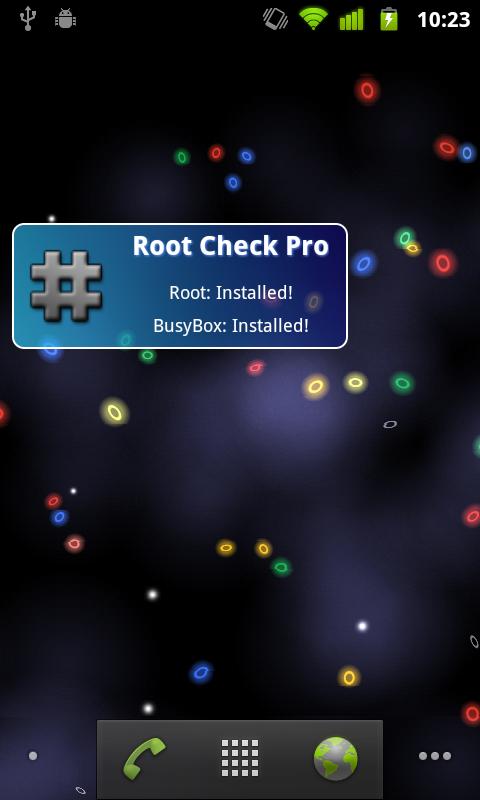
This application will allow the user to confirm they have proper root ( superuser ) access and a proper BusyBox installation.

The goal of this application is to provide even the newest Android user with a simple method to check their device for root access. This application will also allow the user to verify a proper BusyBox installation.

For the more advanced and technically inclined users, many important details are provided around the Root and BusyBox installation. The application presents all the details needed to properly troubleshoot any root or BusyBox issues.
The Root Check mode displays, common su binary locations and file permissions, along with root uid/gid results, Superuser.apk installation and version, adb shell default user mode, and the System defined PATH.

The application makes it very simple and easy export the detailed output via email or any other social media application installed on the device (Twitter, SMS, etc). Easy sharing of the detailed and technical results provides convenience for sharing! One simple button press allows Root or BusyBox details to be shared for collaborating or troubleshooting!

This application will test the device for root access. Very simple, quick and reliable test method to check for root access. The su binary is the most common binary used on Android devices to grant root access. This application will check and verify the su binary location and permissions on the device. This information is generally the most helpful in diagnosing issues with root access.

A common method for resolving issues around properly installing and configuring root access via the su binary is to gather the permissions around the su binary along with the installation location. All this information is quickly summarized in a few seconds by this application. To grant even greater convenience, this information can be quickly exported and shared for assistance in resolving su binary and root issues.

The widget provided along with this application allows easy and constant monitoring of root access status. The widget allows the user to setup a timer interval to check for root and busybox status. The widget will always keep the user up to date via on screen widget notifications regarding root and busybox installation and operating status.

Komentarze:

Nie ma jeszcze żadnego komentarza. Dodaj go jako pierwszy!

Aby dodawać komentarze musisz się zalogować

obrazek
FREE TRANSFER. KOMENTARZE MILE WIDZIANE.
BĘDĘ WDZIĘCZNY JEŚLI ZACHOMIKUJESZ TEN FOLDER DO SIEBIE ;)


obrazek
Inne pliki do pobrania z tego chomika
Opis GO SMS Pro jest profesjonalną wersją GO SMS. Jest za darmo, ma super wygląd, wybór między formą czatu i listy, dodatkowe okna, możliwość tworzenia i odzyskiwania kopii zapasowej, szyfrowanie, czarną listę, zarządzanie folderami, tony opcji personalizacji i wiele innych. - Wsparcie dla folderów. Znajdziesz tam Skrzynkę odbiorczą, Skrzynkę Nadawczą, Wysłane i Wersje Robocze. Poza tym możesz również stworzyć swój własny folder (również zaszyfrowany) i przechowywać w nim swoje najważniejsze wiadomości. - Wsparcie dla gestów. Możesz się przełączać między "Wiadomości"i "Foldery" przez przesunięcie palcem po ekranie (Ustawienia - Ustawienia Wyglądu - Ustawania Przejścia - Metoda przejścia) - Wsparcie motywu DIY. Po wybraniu motywu DIY, możesz zmienić tapetę motywu DIY Ustawienia - Ustawienia wyglądu - Dostosowanie skrzynki odbiorczej - Zmień tapetę - Wsparcie dla wielu języków w niezależnych paczkach językowych (Ustawienia - Ustawienia aplikacji - Wybór języka) - Wybór pomiędzy trybem czatowym i listowym - Super motywy - Dodatkowe okienko dla szybkiej odpowiedzi - Pełne wsparcie dla wiadomości MMS i SMS - Nie wymaga zainstalowanego systemowego menadżera wiadomości - Widżety - Pełna modyfikacja wyglądu - Ustawienia dla wielu użytkowników - Możliwość zrobienia kopii zapasowej wszystkich wiadomości - Zabezpieczenia - Czarna lista - Animowane elementy wyglądu - Dopasowywanie ustawień dla pojedynczych kontaktów (powiadomienia, podpis i konwersacja) - Indywidualne dzwonki kontaktów - Wybór wielu - Dzielenie dużych wiadomości dla CDMA - Dostosowanie przesunięcia czasu - Unikanie złej kolejności wiadomości; sortowanie według czasu lub kolejności wysłania/odebrania wiadomości - Szybkie wiadomości - Tryb nocny - Grupowanie wiadomości - Przypomnienia o wiadomości - Tryb prywatny (belka powiadomień i dodatkowe okna) - Wsparcie grup telefonu, Google i GO SMS - Pisanie grupowe - Przesyłanie opinii i sugestii: Sprawdź jakie to łatwe i szybkie; GO SMS jest ładniejszy, mniejszy i szybszy niż Handcent i ChompSms obrazekobrazekobrazek
Opis A Fast HDR camera experience with regular updates and new features added all the time. Now with optional Android 4.3 style user interface Snap Camera lets you take pictures and record video with a single click, no cluttered preview screen, just the two buttons you really need. Snap Camera's interface is based on the camera included in Android 4.3 (jelly bean) on the Nexus 4 but with many extra features. If you want to test this camera before buying, please install the trial version.. The trial version has all the features of the paid app but will only start immediately in Airplane mode. Snap Camera has a simple, powerful user interface featuring: * Touch to focus * Pinch to zoom * Swipe to review * Long press to adjust photo settings with the photo controller. The photo controller includes settings for: * Colour and Contrast (if supported by the hardware). * Silent Shutter * Burst Mode * Self Timer * Stable Shot * Panorama mode * Flash mode * Whitebalance * Exposure * Grid lines * Fast picture mode * HDR * Additional Settings The additional settings menu gives you access to many extra settings. * Picture and Video Size * Scene mode * Self Timer delay * Burst Mode settings * Time Lapse * Still and Video Focus Modes * JPEG Quality * Effects * ISO * Anti-banding * Scene Detection * Video Bitrate, Format and Codec * Audio Settings The photo editor lets you: * Add colour effects * Add a border * Crop, Rotate, Mirror * Straighten * Add image effects * Histogram Modification * Vignette Additional Features - You can see what effects will be applied and undo an effect at any time from the history menu - Share an image with any other app such as Facebook or Google+ by clicking on the share icon - Create panoramas by selecting the panorama icon (Android 4.0 and above) - Fast picture mode instantly captures photos at the preview resolution. - Capture still snapshots during video recording (if supported) - Use the volume buttons to focus and take a picture or zoom - Auto torch mode for low light video recording - Use the advanced video settings to record video in resolutions not allowed by other cameras. For example, this gives you 720p video recording on the Nexus 7. - Stable shot mode only takes a photo when the camera is completely still, High Dynamic Range (HDR) HDR is a feature that lets you take pictures of scenes with very dark and very light areas. Swipe up on the controller to enable HDR mode. The app takes two photos at different exposures and combines them to make one HDR photo. obrazekobrazekobrazek
Opis WinZip, the world's #1 zip utility, makes it easy to view, open and save zip files on your Android device, whether they're attached to an incoming email, downloaded from a web page or opened from an SD memory card. WinZip for Android Top Features - Receive a zip file and view supported image, text and web files directly within the WinZip app. Easily open other popular file formats with 3rd party app integration. - Open encrypted Zip files (including AES128 and AES256) to review sensitive material safely while on the go. - Copy unzipped content to the clipboard to paste into an email or another application. Save the last extracted zip file to access at later time. - Automatically unzip and install Android apps (.apk files) delivered as .zip files from Google Play or the Amazon Appstore. File Support and 3rd Party Integration WinZip for Android lets you view: - Photos and images (.jpg, .jpeg, .png, .bmp, .gif) - Text files (.rtf, .csv, .txt, .ini, .inf, .bat, .js, .log, .xml,.css, .java, .cs, .h, .m,.cpp,.c,.sql,. properties) - Web files (htm, .html,.jsp,.asp) WinZip for Android lets you open other popular file types in 3rd party apps: - Word documents (.doc, .docx) - Excel spreadsheets (.xls, .xlsx) - PowerPoint presentations (.ppt, .pptx) - PDF files (.pdf) WinZip for Android builds on the success of WinZip for iOS, introduced earlier this year and already downloaded by more than a million people. WinZip tools are now available on all of the industry’s most popular platforms – Windows, Mac, iOS and Android. Compatible with Android operating systems 2.1 (Eclair), 2.2 (Froyo), 2.3 (Gingerbread), 3.x (Honeycomb) and 4.x (Ice Cream Sandwich), WinZip for Android is available now as a free English app. obrazekobrazek
Nieograniczona terminowo, kompleksowa ochrona przed każdym rodzajem zagrożeń dla urządzeń mobilnych. obrazekobrazekobrazekobrazek
Opis This version of Bike Race has: - All levels unlocked! - No Ads! In this simple and fast-paced physics-based free game, tilt your device to lean your bike and touch the screen to accelerate/brake. Features: - Multiplayer - Simple controls - 14 addictive worlds - 112 challenging tracks - 16 amazing bikes - Touch to accelerate, tilt to lean the bike - Cool stunts Bike Race is brought to you by Top Free Games - the creators of the #1 game in the google play store, Racing Penguin. Multiplayer Mode is available! Try to become the best biker on Android! A few words from our fans: "This is the funnest bike game in the history of bike games" "This game was so much fun I lost my job and my wife left me. I sure hope they will reimburse me for my life." "Fantabulous" "Hide this one from the kids, you're gonna want to spend some quality time playing this one yourself!" "This game changed my life" "I have had this game for a couple months very good game constant level updates love it thanks." "If it where a 10$ game i would buy it" "I can play it everyday for the rest of my life" "Great 2 player. Similar to words with friends but so much better!" "Bike Race is the best game I have ever played in my life." "Fun fun fun!!! Best motorcycle game in the world" "I don't know if it is a kids game, but I play more than my kids! Really cool game" Bike Race. obrazekobrazek
Opis Cechy: - Aplikacja jest bezpłatna i motywy są darmowe. - Łatwo wrócić do starych ustawień ekranu głównego (choć wątpię chcesz!). - Wszystkie motywy są konfigurowalne, czy można ich używać tak jak jest. - Nowy "Ulubione" kartę w szufladzie aplikacji pozwala szybko uzyskać dostęp do najczęściej używanych aplikacji. - Themer technologia Akcje uczy preferencji aplikacji. To nie ma znaczenia, czy używasz Pandora czy Spotify dla muzyki, WeatherBug lub AccuWeather dla pogody, lub TweetCaster lub HootSuite na Twitterze. Themer będzie zrobić to dobrze. Instrukcje podstawowe: - Po instalacji, należy wprowadzić swój kod, po którym Themer będzie stosować "Witamy", motyw do urządzenia, który wyjaśnia, jak znaleźć motywy. - Po zastosowaniu swój pierwszy temat, naciśnij długo ekranu głównego i wybierz "Przeglądaj motywy" (lub kliknij ikonę Themer w szufladzie aplikacji), aby powrócić do menu Themer. - Aby Themer ekranu głównego domyślne, przejdź do menu Themer i wybrać "Set Home". Kliknij przycisk "Themer" i "Always". - Aby wrócić do starego ekranu głównego, przejdź do menu Themer, wybierz "Ustawienia", "Themer" i "Przywróć Old Ekranie". - Po zastosowaniu temat, machnięcia w dół w dowolnym miejscu na ekranie, aby zobaczyć swój pasek powiadomień. Przesuń w górę, aby ją ukryć. Proszę sprawdź nasz poradnik wideo (http://www.youtube.com/watch?v=sqfkumDYD2E) i bloga (http://www.themerapp.com/blog) aby uzyskać więcej informacji. Należy pamiętać, że Themer obsługuje większość, ale nie wszystkie urządzenia z systemem Android 4.1 +. Ciężko pracujemy, aby doprowadzić ją do większej liczby urządzeń i starsze wersje Androida. Jeśli używasz niestandardowych ROM, który wpływa dpi lub wymiary zmienia ekranowe (np. usunięcie klawiszy), nie będzie w stanie zobaczyć żadnych tematów. Proszę przywrócić do pierwotnej konfiguracji Themer do prawidłowego funkcjonowania. Poniżej znajduje się lista rozdzielczości ekranu, które umożliwia: 1920x1080 1776x1080 1280x720 1184x768 1184x720 960x540 888x540 800x480 obrazekobrazek
Opis Around Sound Pro allows you to listen to music, watch movies and play games while still being aware of your surroundings. 
What it does: Pro Street Mode:
 +Walk down the street and only hear the noises above the set trigger level. Never interrupts your music. For Games: Non-pause should work well. Request support for Around Sound's Pause Mode from your favorite game's developer. Pause Mode:
 +Uses your headset's microphone to listen for loud noises and pause your music or movie if one is detected, then play back the sound that triggered the pause and continues for a short period of time the optionally resumes your music or movie. Non-Pause Mode: +Uses your headset's microphone to listen for loud noises and dips your music, movie or game volume if one is detected, then play back the sound that triggered the pause and continues for a short period of time then returns to regular volume. Bluetooth Mic Option: Currently only works with mono headsets and some AD2P kind As seen on: ★Lifehacker★ ★evolver.fm Editor's Choice★ ★Gizmodo★ Where would I use it?

 +At the office: pause your music automatically when someone is trying to get your attention 

+At home: Don't miss door slams, children crying, your dog barking, or other warning signs

 +At the airport: Relax at the gate and have your music or movie pause when the gate announcements start

 +Anywhere relatively quiet where you want to know if something happens around you Best to use with: 

Sound isolating earbud headphones with mic - These are practically earplugs now, so don't miss out on what's around you.
 You can use it with just headphones but be aware the microphone used is now your phone. So leaving it in your pocket wouldn't work so well. How to use: 

Make sure your headset is plugged in. 
Simply start the app, push Start, see the noise level around you, set the trigger level by using your finger to swipe the meter, hit the home button to access your music app and enjoy. Permissions Needed: 

Phone Calls: Read Phone status (shuts off the audio processing during calls)
 Hardware Controls: Audio Settings, Record Audio (to use the microphone, no audio is ever stored) Bluetooth: To support Bluetooth microphone option Broadcast Sticky: To support Bluetooth microphone option Limitations:

 -Needs Froyo or Above (Android version 2.2+) -For Pause Music Mode: You can't be in a really loud environment otherwise the microphone input will be maxed out and there is no way to detect a louder sound. Use Street Mode instead obrazekobrazek
Opis Przeżyj broń II wojny światowej, jak nigdy przedtem. Weaphones WW2 Edition redefiniuje co termin strzelanka oznacza. Nie tylko gry, być jej częścią. Chwycić urządzenie i poczuć, jak to jest ładowanie, ładować, wyczyścić i strzelać z broni palnej. Z Weaphones WW2 można przeżyć swoje największe fantazje strzelaninie i pozostają w 100% bezpieczne. Weaphones oferuje jedne z najbardziej znanych broni palnej WW2, z niemieckiego Luger do amerykańskiego pas karmione M1919. Wiele broni są konfigurowalne; dodaj bagnety, lunety, Bi-pods i wiele więcej! Jeśli nie wiesz jak obsługiwać szczególną broń, odświeżyć nasze pełni animowane krok po kroku tutoriale. Z wysokiej rozdzielczości, posiniaczone bitwy, pistolety, strzelby i karabiny maszynowe, do autentycznych mechaniki broni zmieszanych z realistycznego dymu, odrzut, flash kaganiec i efekty dźwiękowe, Weaphones jest o realizm. Wszystko można dostosować do potrzeb użytkownika. Zmień rozmiar broni, aby umieścić wszystkie elementy sterowania w zasięgu ręki. Obracanie i przerzucanie aby najlepiej dopasować urządzenia i preferencji ręki. Na obsługiwanych urządzeń, włączyć funkcję lampy błyskowej aparatu i jeszcze bardziej usprawnić, wykorzystując moc wbudowanej lampy błyskowej do symulacji prawdziwego płomienia wylotowego. Za cenę jednego .30-06 Springfield rundzie masz wszystko. Nie up-sells lub In-App-zakupy, po prostu czysta zabawa i darmowe aktualizacje (nowe pistolety). _______________________________ »Realistyczne Ogień, Dźwięk, Smoke, Flash & Recoil Effects »Pełna kontrola interakcji i »Autentyczne Mechanics Broń »Broń dostosowania »No Up-Sells lub In-App-Zakupy, masz wszystko Plus darmowe aktualizacje »Szczegółowe Full HD Graphics »Dostosowania do rozmiaru użytkownika wielkości dłoni i preferencji → Lefty Klapki → Obrót 180 ° → Skala → Przesuń »Zmienne regulowane użytkownika → nielimitowana amunicja → Auto-Reload → Zagłuszanie Weapon → Akcelerometr Przeładunki → Camera Fotografowanie Flash Weapon »Wskaźnik State (" Dlaczego nie jestem strzelanki? ") »Ultra Szczegółowe Step-By-Step Animated Tutorial dla każdej Weaphone Wsparcie Flash »Multi-Touch, akcelerometr i aparat »Social Media Driven zawartość Future _______________________________ obrazekobrazekobrazekobrazek
Opis This is a premium version of Tapatalk with built-in Photo Editor, unlimited photo sharing to Tapatalk without Tapatalk logo watermark. Fully tablet optimised to make use of additional screen real-estate. Support Android Developer building great Android app :) What is Tapatalk? Discover great internet communities or stay connected with your favourites community on-the-go with this award-winning mobile app. Tapatalk is the only mobile app combing over 50,000+ internet communities with a streamlined mobile experience, allowing you to share and follow thoughts, photos, opinions to all your communities within a single mobile app. Tapatalk aggregates content from network of communities of common interests, from automotive to parenting, from gardening to horse-riding - You will meet passionate people who share the same interest and participate in great discussions on topic only you and the like-minded members truly appreciated. obrazekobrazekobrazekobrazekobrazek
obrazek ► Device manager *1 ◊ Device profiles (CPU, IO, components) ◊ Tasks scheduler (app management, clean-up, etc) ◊ Device watchers to automatically activate a profile, run tasks or display alarms ◊ Battery savings using profiles and tasks ► File explorer *1 ◊ Batch copy/paste, zip, delete, move, share and stream files and folders ◊ Change files/folders permissions and ownership ◊ Access all your Samba network shares ► Application manager *1 ◊ Backup app apk/data (multiple versions), sms and call-logs ◊ System app uninstaller and update cleaner ◊ Share (email, bluetooth, dropbox, google drive, etc) ◊ Move any apps to user, system, SD or link2SD ◊ Freeze/unfreeze apps, crystallize (eg hibernate/greenify) control app startup and events ◊ Zip align, clear cache, wipe dalvik-cache, fix permissions and optimize databases ◊ Control app permissions, locker (secure access), rotation and force screen-on *2 ◊ Notification disabler on JB+ ◊ Usage and standby statistics (find app draining your battery) ► Network manager ◊ Set WiFi access point priority ◊ Configure Android firewall *1 ◊ TCP Congestion control *1 ◊ DNS Changer *1 ► Task manager ◊ Check CPU, network and memory usage ◊ Kill (default) or force-stop *1 any apps or kernel processes ◊ Automatic task killer, memory booster, memory cleaner ► System Control *1 ◊ CPU governor, frequency, voltage, GPU controls, thermal and MPDecision controls ◊ Build.prop and sysctl editor (basic and advanced mode) ◊ Boost, analyze and benchmark SD cards ◊ Android memory manager, memory cleaner, SD linker (directory binder) ◊ fsync, sweep2wake, gamma and fast charge control ◊ Safe: restore defaults from app or recovery and CPU settings on boot-loop ► System Monitoring ◊ All Android applications or all processes, battery, CPU, network, memory ◊ Component states (WiFi, Bluetooth, GPS, 3G, Phone, APN) ► Status bar notifications ◊ Battery, cpu, memory, sd, temperature optionally with graphics in drop-down ◊ Add battery remaining bar on top or bottom ◊ Remove original battery icon ► Highly Configurable Widgets ◊ Resizable gauge widget ◊ 1x1 and 2x1 (PRO ONLY) text widgets ◊ 2x1-5x2 graphic widgets (PRO ONLY) ◊ 1x1 and 4x1-1x4 (PRO ONLY) toggle widgets *1 ◊ 4x4 summary widget (PRO ONLY) ► System Toggles (manual widgets or in profiles) ◊ GPS, WiFi localization ◊ WiFi, BT, BT discoverable, APN, NFC, airplane ◊ Tethering (USB, WiFi, BT) ◊ Brightness, screen time-out, stay awake, flashlight ◊ Ringer, vibrate, synchro, background data ◊ Debug (over WiFi), unknown sources, USB storage, reboot ► Terminal Emulator & Script Editor ◊ Command history ◊ Run or test any scripts, optionally on boot ◊ Share scripts, commands and outputs ► System Logs Reader *1 ◊ Logcat reader ◊ Kernel messages (dmsg, kmsg) ◊ Advanced filtering and search and much more that meets the eye ☺ *1 Requires root and kernel support for full feature *2 Requires root and Xposed framework
więcej plików z tego folderu...
Zgłoś jeśli naruszono regulamin
W ramach Chomikuj.pl stosujemy pliki cookies by umożliwić Ci wygodne korzystanie z serwisu. Jeśli nie zmienisz ustawień dotyczących cookies w Twojej przeglądarce, będą one umieszczane na Twoim komputerze. W każdej chwili możesz zmienić swoje ustawienia. Dowiedz się więcej w naszej Polityce Prywatności